Find dominant colors:
Get dominant colors of image online - IMG online
Find nearest names:
Find the Nearest Matching Color Name (shallowsky.com)
Add labels in LabelImg:

Find dominant colors:
Get dominant colors of image online - IMG online
Find nearest names:
Find the Nearest Matching Color Name (shallowsky.com)
Add labels in LabelImg:
dotnet nuget add source https://pkgs.dev.azure.com/dnceng/public/_packaging/dotnet-eng/nuget/v3/index.json
dotnet nuget add source https://pkgs.dev.azure.com/dnceng/public/_packaging/dotnet-public/nuget/v3/index.json
dotnet nuget add source https://pkgs.dev.azure.com/dnceng/public/_packaging/dotnet6/nuget/v3/index.json
dotnet workload install maui
git clone https://github.com/nats-io/nats-streaming-server.git
go run nats-streaming-server.go -DV -cid stan
May be you think is a command line tools and you are right. I only can add, it is possible to run GUI for some decompilers using wine. To do this you need to setup .NET 4.7 and .NET Core 3.1 in wine prefix with winetricks utility.
DisSharp works great, but do not forget to change fonts to available:

Kaliro have missed fonts setup from the box, but classes are listed:

There is a few services that can describe your images with keywords:
https://labs.everypixel.com/api/demo
https://deepai.org/machine-learning-model/text-generator
https://deepai.org/machine-learning-model/text2img
I have Lenovo x131e for me, but I can not setup Chromebrew even with old version. Chrome Os is a pleasure but I need to update. So that, I spend time to disassemble my device and disable write protection with switch. The only way to change firmware on Lenovo x131e is instruction:
sudo mount -o remount,rw -io exec /home/chronos/user/
sudo ./flashrom -r x131e_chromeos_original.rom
flashrom v0.9.4  : bc6cab1 : Oct 30 2014 07:32:01 UTC on Linux 3.8.11 (x86_64), built with libpci 3.1.10, GCC 4.8.x-google 20140307 (prerelease), little endian
The Flash Descriptor Security Override Strap-Pin is set. Restrictions implied
by the FRAP and FREG registers are NOT in effect. Please note that Protected
Range (PR) restrictions still apply.
Reading flash... SUCCESS
./flashrom -w coreboot-stout-seabios-270514.rom There is storage of firmware rooms: https://johnlewis.ie/Chromebook-ROMs/stout/https://github.com/MrChromebox/scripts/blob/master/cbmodels.json

This update dive me a chanse to run github.dev editor for my public repositories. I wish I can edit my code even from my old chromebook with Gallium and Chromium in the future. But for now it has error

Refeence:
https://wiki.archlinux.org/title/Chrome_OS_devices/Custom_firmware
Write Protected BIOS on x131e : chromeos (reddit.com)
write-protection switch on lenovo x131E-English Community
lenovo x130e / thinkpad x130e disassembly remove motherboard/ram/hard drive etc.. - YouTube

DE:BUG Magazin für Elektronische Lebensaspekte. Published since 1997, based in Berlin. Editors: Thaddeus Herrmann, Jan Joswig, Sascha Kösch, Sven von Thülen, Anton Waldt.
DE:BUG
Magazin für elektronische Lebensaspekte
Schwedter Strasse 9a,, 10119 Berlin
Tel.: (030) 28384458 Fax: (030) 28384459
debug@de-bug.de
Red: Sascha Kösch
ERSCHEINUNGSWEISE: Online; Anzeigen möglich.
Letzte Aktualisierung: 16.05.2017
| de-bug.de | 85.214.249.181 | 5 hours 59 minutes 59 seconds |
It looks like DE:Bug Magazine stops working. A tons of reviews I might read since I found it in 2004. Thank you DE:Bug, Long Live Netlabels!
Reference:
https://de.wikipedia.org/wiki/DeBug
https://archive.org/search.php?query=de-bug.de
https://soundcloud.com/de-bug-de
https://www.yumpu.com/user/de.bug.de
http://www.miz.org/details_13747_269.html
https://www.12k.com/review/debug-de-12k1049/
http://www.pixelbug.de/electro-debug.html
https://business.facebook.com/debug.magazine/
https://monoskop.org/De:Bug
I can recommend two online tools I am using to obtain super resolution and remove blurry in images.
https://bigjpg.com/ - is for super resolution
this tool for restore photos in mouton also help with sharpness:
https://beta.smartmine.net/service/computer-vision/image-deblurring
This evening I have found win-image-crawler have no ability to write long path for a destination in Windows. But I need a test data for tomorrow morning. It could be possible with Linux, but original crawler tool have .Net Framework 4.5 project type. After MSDN answer I got new tool, saver of my day:
The result Is excellent, the tool also port all packages with right .net core versions:


The kind of old good console interaction, thank you, Microsoft!

Here is a peak of critical thinking in protecting my life in ghettos. Walking through the night to stay against to thug and crackhead to carry the combinatorial magic of programming for a better world.
I use deb packets to setup access and after install sometimes I have no TURN ON button to enable my computer.
There is an answer:
mkdir ~/.config/chrome-remote-desktop
It looks like some permissions missed to create configuration folder.
I should prepare my projects carefully to win additional stars. How to count them using starz packet:
C:\Users\epiro>npm install -g starz
C:\Users\epiro\AppData\Roaming\npm\starz -> C:\Users\epiro\AppData\Roaming\npm\node_modules\starz\starz.js
+ starz@0.0.2
added 5 packages from 3 contributors in 2.638s
C:\Users\epiro>starz arise-project -l 5
I bought Epson LQ-100 and two cartridges and in free time I am investigating for does it work. I think cartridges capacity will be enough to print work checklist all the winter. To spend less ink I moved to print directly with hardware fonts available. To do this on windows:
1. I setup printer from list provided by Microsoft.

2. Enable printer pooling from LPT1 to my virtual usb com port. This helped to use command line to direct print through LPT1, it is very fast and cheap.

3. Setup LPT1 in console to my printer.
net use lpt1 "\\localhost\EPSON LQ Series 1 (80)" /persistent:no
4. Print "Hello Word":
echo "Hello Word" > lpt1
My checklist sometimes have been changed and when I set some attributes to steps, I need to properly merge new description with existing attributes. But this is only a text and I want to recognize it is new step in check list or updates to existing. For example
Step1 instruction
Sterp2
I want to change to:
Step1 instruction details
Step2
Then, of course, Sterp1 details is replacement for Sterp1
Metric Longest Common Subsequence from java-string-similarity package helps determine text distance:
MetricLCS lcs = new MetricLCS();
double current = lcs.distance(
        "Step1 instruction",
        "Step1 instruction details");
current: 0.31999999999999995
How it looks integrated in bot core:

Its promising when my checklists started to archive changes in working process automatically.
Here is a important good news for my ongoing project, I have Bot UI for it directly from Microsoft on my linux. And of course, thank you for this great setup post.
Prerequisites are:
sudo yum install libsecret-devel
npm install --save-dev electron-rebuild
sudo yum install openssl
sudo npm install -g yo generator-botbuilder
Download emulator release
chmod 700 BotFramework-Emulator-4.10.0-linux-x86_64.AppImage
Create bot:
mkdir myBot
cd myBot
yo botbuilder
cd ypbot/
npm start
Then my bot started:

Run emulator with command:
./BotFramework-Emulator-4.10.0-linux-x86_64.AppImage &

Open bot with url http://localhost:3978/api/messages

Say hello to your bot

I had planned to write utility to store documents metadata, stumble upon an kb, a text-oriented minimalist command line knowledge base manager. Let's imagine you have a lot of text and graphics in your system, you need to classify to quick search on it. These documents are known as artifacts, because they all add hyper map to your knowledge then you can obtain it in time, because you know a category or even tag. In my experience, work knowledge base contain thousands of documents and searching with this type of invisible markers make data extraction possible and in many cases incredible fast. So that, how to install KB in Oracle linux:
curl "https://bootstrap.pypa.io/get-pip.py" -o "get-pip.py"
python3 get-pip.py
pip install kb-manager

On ubuntu 20.04
sudo apt install python3-pip
pip3 install kb-manager
Then, kb is located in ~/.local/bin
There is an important to debug .Net Core programs under linux. I thought it's should be different setup for linux OS, but no, thank you for Pluralsight article one sequence for every OS:
1. Add .NET Core Extension Pack.
2. Press Ctrl-Shift-P to open shortcuts to find .NET: Generate Assets for Build and Debug
3. Then use debug pane

I hope debug will help to finish program writing quicker and then you want to writer documentation using UML diagrams. As for me it is hard to draw UML with vector primitives, it is better to utilize PlantUML
Extensions to auto generate uml class diagrams from project code:
1. CSharp to PlantUML - this help to generate all classes in separate .puml files, then you can copy it to your diagram instead of write from scratch

2. PlantUML - this extension helps with intelliSense and preview.

You need to install graphviz in your system too.
Its looks like we have ere of Visual Code for linux workspaces for most of languages!
There is a list of utils in graphviz:
acyclic - make directed graph acyclic
bcomps - biconnected components filter for graphs
ccomps - connected components filter for graphs
circo - filter for circular layout of graphs
cluster - find clusters in a graph and augment the graph with this information.
diffimg - Calculates intersection between two images
dijkstra - single-source distance filter
dot - filter for drawing directed graphs
gxl2gv,gv2gxl - GXL-GV converters
dotty - A Customizable Graph Editor
edgepaint - edge coloring to disambiguate crossing edges
fdp - filter for drawing undirected graphs
gc - count graph components
gml2gv,gv2gml - GML-DOT converters
graphml2gv - GRAPHML-DOT converter
gvcolor - flow colors through a ranked digraph
gvgen - generate graphs
gvmap - find clusters and create a geographical map highlighting clusters.
gvpack - merge and pack disjoint graphs
gvpr - graph pattern scanning and processing language
lefty - A Programmable Graphics Editor
lneato - A Customizable Graph Editor
mm2gv - Matrix Market-DOT converters
neato - filter for drawing undirected graphs
nop - pretty-print graph file
osage - filter for drawing clustered graphs
patchwork - filter for drawing clustered graphs as treemaps
prune - Prune directed graphs
sccmap - extract strongly connected components of directed graphs
sfdp - filter for drawing large undirected graphs
tred - transitive reduction filter for directed graphs
twopi - filter for radial layouts of graphs
unflatten - adjust directed graphs to improve layout aspect ratio
vimdot - Combined text editor and dot viewer
I retrieved it with yum util repoquery:
yum -y install yum-utils
repoquery --list graphviz
Of course, I started with dot for me, but pretty look for all available capabilities in grapviz too.
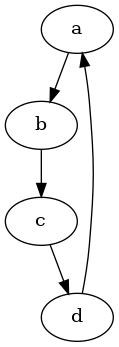
Simple scenario is a image from dot file:
digraph {
a -> b;
b -> c;
c -> d;
d -> a;
}
I took this graph from examples. It is easy to generate such graph in C# code today. Then I want to convert it to image, I found this command:
dot ./1.dot -Tpng > ./1.png
I think, a lot of us want to concentrate on their pc work and especially for me colors are distraction. It is easy do disable color filters on Windows, but it is also possible to disable it and make display graysacle in linux too. There are commands to add 'Desaturate all' to gnome shell.
yum install gnome-tweak-tool
git clone https://gitlab.com/JanMa/desaturate_all.git
mv ~/Downloads/desaturate_all "/home/eugene/.local/share/gnome-shell/extensions"
Alt + F2 then r to restart DE
Enable Desaturate all extension in Tweaks app.
Use small 'three circles' icon on the right top corner to enable grayscale.

It is clear for me, all publishers take their tiers in education process. And O’Reilly is not a beginner in understanding of computer science subject. So that, I can recommend to use publishers as the stairs for unknown technologies or theory and final stair is O’Reilly. In a year I read 20 books, participate in 2 online training and the learning path. The most important thing for me was to realize that there are people who think like me and these people are experts. I can learn logic and pragmatism from them.
This is my recap from Learning Path: Graph Algorithms, By Mark Needham
1. Using a special framework, such as spark, allows you to focus on selecting a method to solve the problem and quickly determine the correctness of the idea, instead of guessing the only correct approach.
2. The importance of linked data is difficult to override, because the collected relationships allow further use of very simple decision-making algorithms. This means that relationships are a step towards simplifying decisions.
3. Determined algorithms are characteristic of generalization, and they cannot always find solutions for small groups in a variety of settings, but they allow you to see the big picture. Probabilistic solutions can improve the overall picture.
4. The graphs above the graphs and the super category are the key to determine the initial solution path, and these structures can be distinguished from the data.
5. It is the iterative approach in determining the desired algorithm, rather than a single selected approach, that allows you to achieve a solution that will reliably solve the problem, thus experimenting and making conclusions, this is the key to creating reliable solutions, instead of a completely theoretical approach.
Thank you, O’Reilly Learning for this year with me.
71 jounals still available on issuu with great story of netlabels time. debug_mag Publisher Publications - Issuu


